The prompt set is the product. Manage it like one.
The prompts Rankwize monitors for AI citations are the foundation of everything else you do here. Prompt Management is the operator surface for that set — where prompts enter from four sources, move through a clear lifecycle, and stay under a deliberate cap. Starter, manual, discovered, promoted: every prompt you track lives here.
On every plan, including Free
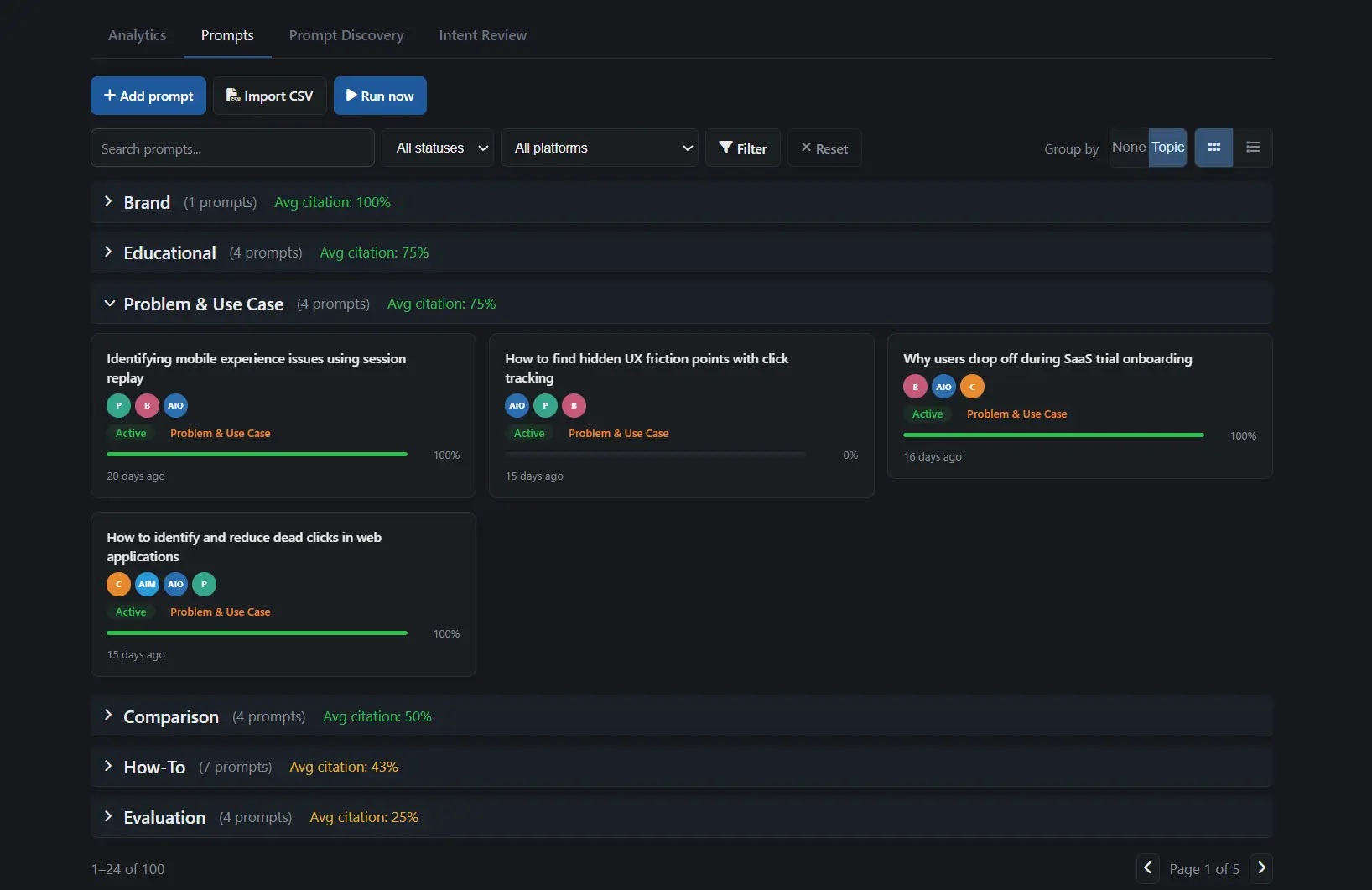
The spine of everything you track.
Almost every other capability is upstream or downstream of your prompt set. Prompt Discovery feeds candidates in. Monitoring runs against it. Diagnosis, briefs, and the AEO Editor all draw from it.
That makes Management the spine — the one surface where you decide what is and isn't tracked. Get this set right and the rest of the platform points at the right targets.
Feeds in
Prompt Discovery proposes scored intents; approved ones become tracked prompts.
Prompt Management
The tracked set itself — what you monitor, in what state, under what cap. Monthly Rebalancing tunes each prompt's budget on 30-day performance, and can promote a watched prompt in.
Draws from
Monitoring, diagnosis, briefs, and the AEO Editor all act on the prompts you keep here.
Four ways prompts enter your set.
Every prompt carries its origin, so you always know how it got into the set — and they don't all arrive the same way.
Starter
When you finish setup, Rankwize seeds a starter set of prompts from your domain — so you're tracking AI citations from day one instead of a blank list.
Manual & CSV
Add a prompt in the form, or bulk-import a CSV — a prompt_text column is all that's required. A platforms column is accepted but stored as metadata; monitoring always runs against your account's monitored engines, not a per-prompt list.
Discovery
Intents from Prompt Discovery that clear J7 activation routing — or that you approve in the Intent Review Queue — graduate into your tracked set. (Discovery itself is a Business + Diagnose capability.)
Promoted
Escalated automatically. A gap-escalation job (B5) or Monthly Rebalancing can promote a prompt into the tracked set when 30-day performance warrants it.
One lifecycle, no surprises.
A prompt moves through five states — and each one has clear rules about monitoring spend and whether it counts against your cap.
Draft
Staged but not yet running. No monitoring spend, no cap count until you activate.
Active
In rotation. Runs on your plan cadence and counts against your prompt cap.
Paused
Temporarily out of rotation without losing its history. Resume any time.
Retired
Done tracking, but kept on record. Out of rotation, history intact.
Archived
Excluded from the cap and hidden from the default list. Starter-origin rows can be restored individually, subject to your cap.
Cap discipline, not throttling.
Every plan has a fixed number of active prompts. That isn't a paywall in disguise — it's a forcing function. A bounded set makes you decide which prompts actually matter, instead of tracking a thousand and learning nothing from any of them.
A cap-status widget shows exactly where you stand, with a per-origin breakdown of what's filling the slots. When the starter filter is active, an "Archive all starters" action clears the seed set in one move — useful once your own prompts have taken over.
| Plan | Prompt cap | Cadence |
|---|---|---|
| Free | 5 | Weekly |
| Watch | 25 | Weekly |
| Pro | 50 | Weekly |
| Business | 150 | Daily |
| Scale | 300 | Daily |
Run Now
Trigger a run on the prompts you select, or on every active prompt — without waiting for the next scheduled cycle.
Cadence
Weekly on Free, Watch, and Pro; daily on Business and Scale. The schedule runs whether or not you touch it.
Manual runs per month
Paid plans get manual triggers on top of the schedule — 2 a month on Watch, Pro, and Business, 3 on Scale. Free runs on the weekly cadence with no manual runs; it's the first thing Watch unlocks.
Run on schedule — or on demand.
Tracking runs on a cadence set by your plan, so the set stays current without you doing anything. When you've just shipped a fix and don't want to wait for the next cycle, a manual Run Now re-checks the prompts that matter.
We're honest about the split: manual runs are metered, and Free doesn't get any. That limit is real, not a dark pattern — it's the clearest reason teams move to a paid tier.
What you see for every prompt.
Open any prompt and the detail panel shows the evidence behind its status — per platform, per run, with the path to the fix.
Per-platform status
For every engine you monitor: Cited, Mentioned (named without a citation), or Invisible — at a glance, per prompt.
Who got cited
The citation URL when you were cited, or the competitor URL when someone else was — so an invisible prompt always names who took the slot.
Sentiment & framing
How the AI framed the mention, with the likely reason behind it — not just whether you appeared, but how.
Citation trend
A sparkline of citation rate over time; click through to the exact runs behind any point.
Linked recommendations
The fix recommendations diagnosed from this prompt, so the path from gap to action is one click away.
Matched content
The pages scored against this prompt — with Search Console clicks, CTR, and position when GSC is connected.
Prompt Management ships on every plan, including Free.
There's no gate on managing your prompts. What scales with your plan is the cap, the cadence, and your monthly manual runs.
| Plan | Prompt cap | Cadence | Manual runs/mo |
|---|---|---|---|
| Free | 5 | Weekly | 0 |
| Watch | 25 | Weekly | 2 |
| Pro | 50 | Weekly | 2 |
| Business | 150 | Daily | 2 |
| Scale | 300 | Daily | 3 |
Frequently asked
What plan do I need for Prompt Management?
Every plan, including Free. Prompt Management is the surface where you manage your tracked prompts on all tiers — there is no separate gate. What changes between plans is the prompt cap and the run cadence: Free tracks 5 prompts on a weekly cadence, scaling up to 300 prompts with daily refresh on Scale.
What's the difference between Prompt Management and Prompt Discovery?
Prompt Discovery generates candidate prompts — it analyzes your domain and proposes 70 to 110 scored intents. Prompt Management is where the prompts you actually track live: you activate, pause, retire, and organize them here. Discovery feeds into Management (approved intents become tracked prompts); it does not replace it. Discovery is a Business + Diagnose capability, while Management ships on every plan.
How does the prompt cap work — can I exceed it?
Each plan has a fixed cap on active prompts (5 on Free, up to 300 on Scale). Archived prompts do not count against it, so archiving is how you make room without losing history. The cap is a discipline, not a soft limit you can overrun — when you hit it, you either archive something or raise your plan. A cap-status widget shows where you stand, with a per-origin breakdown of what is taking up the slots.
How do I remove prompts I no longer want to track?
Archive is the default, non-destructive workflow: archived prompts drop out of the list and out of the cap, and starter-origin prompts can be restored later. Bulk actions cover update and archive — there is no bulk hard-delete. An individual prompt can be hard-deleted for cleanup, which cascades to its platform state, links, and runs, but archive is recommended for anything you might want back.
Which plans get daily runs versus weekly?
Business and Scale run daily; Free, Watch, and Pro run weekly. On top of the scheduled cadence, paid plans get manual "Run Now" triggers each month — 2 on Watch, Pro, and Business, and 3 on Scale. Free gets the weekly cadence with no manual runs.
Do the platforms in my CSV upload get monitored per prompt?
No — and this is deliberate. A CSV can include a platforms column, but it is stored as metadata only. Monitoring runs against the set of AI engines configured for your account, so every prompt is measured consistently across the same engines rather than a different list per row.
Discovery fills it, rebalancing tunes it, briefs and the editor draw from it.